


MIHA AI
NSF-Research Experimental tool
Can personalization of LLM interfaces increase adoption of these AI tools for health?

ROLE
UX Designer &
UX Researcher
TIMELINE
8 Months
TEAM
1 PM
2 Engineers
1 Designer (me!)
PROJECT TYPE
AI/LLM For Health,
Older adults
OVERVIEW
AI will transform health information access—but only if we design for trust, not just speed.
As LLMs replace search engines, a critical population remains skeptical: older adults who don't trust black-box systems with high-stakes health decisions. The problem isn't capability—it's trust. When AI can't explain its sources or show what data it stores, cautious users avoid it entirely.
MIHA (Multi-Modal Intelligent Health Assistant) rethinks AI for health by putting users in control. It adapts its transparency, citations, and data handling to individual concerns, proving that trustworthy AI requires personalization, not simplification.
SOLUTION
MIHA is a large language model (LLM) AI assistant designed to adapt its UI to individual user concerns while delivering personalized, trustworthy health information.
MIHA (Multi-Modal Intelligent Health Assistant) is designed to support older adults’ health needs by providing personalized answers while addressing their concerns about using AI with UI adaptation.
*MIHA was developed as a proof-of-concept tool for our NSF-funded research.
Unlike standard AI chatbots with fixed interfaces, MIHA's UI changes based on user preferences: some see chat history front and center, others see source citations, and some get easy access to privacy controls. Same AI, personalized transparency.
A 3-step onboarding process to personalize users' experience
.png)
Chat screens for users' AI concerns preference
Preferences set as 'NO'

Preferences set as 'YES'

CURRENT LANDSCAPE
Today, many people turn to general-purpose AI tools like ChatGPT, Gemini, and Claude for health information—despite these platforms not being designed specifically for medical guidance.
Because mainstream AI models learn from large, non-specialized datasets instead of validated medical resources, their health outputs can be misleading or incomplete.
While some users rely on general AI tools for health information, a significant portion remain skeptical, citing concerns around reliability, transparency, and trust.
PAIN POINTS
1. Users don't feel in control of their data
There is uncertainty about what personal and health information is collected, stored, remembered, or shared, which creates hesitation in engaging openly with the system.
2. Lack of transparency in sources & response generation
When it is unclear where health information comes from or how responses are generated, confidence in the system’s accuracy and reliability is diminished.
We pinned down five major concerns older adults had while using intelligent assistants for health information that was really affecting how they view these assistants.
1. Not having enough information about privacy policies.
2. Not knowing how their health & personal data is being handled and who is it shared with.
3. Not knowing how much information the system remembers from their past conversations.
4. Not knowing if the responses are coming from legitimate sources.
5. Not knowing the extent of information it stores about them.
GOAL
Increase user adoption of intelligent assistant for health information by building user trust and giving users control over their data
We wanted users to have a personalized experience such that trust is build between the AI and the user; but here’s the thing—every user has their own unique combinations of the above concerns—so we not only need to make MIHA personalized for health, but also for their concerns.
How might we design a personalized experience that caters to an individual's unique health needs while also addressing their specific concerns?
DESIGN PROCESS
Building a personalized health LLM means understanding the user conditions
For building a personalized health LLM that has adaptable interface and gives personalized information, we had to understand what information should the user be giving the MIHA, and how were we planning to make an interface that adapts to users’ needs.
1. Data gathering for personalization of responses
We initially explored a wide range of data types but narrowed them down for technical feasibility and simplicity. Personalization was focused specifically on users’ chronic illnesses, medication intake, and allergies at this time.

2. Defining Key User Preferences
Next, we identified the key preferences that would let users customize the UI according to their needs and concerns. To keep implementation simple, we finalized five preferences, each with binary choices—YES or NO.

3. Designing the onboarding to support personalization
After defining the data types needed for response personalization and the concern categories for UI adaptation, we designed the onboarding experience to collect this information.
Onboarding experience

Through a simple three-step process, users provide just enough information for MIHA to personalize the experience to their needs and health conditions.
Defining the features for adaptable UI to build trust & user autonomy
Now that we defined the key user preferences, we moved to creating a feature chart—to explain which features would be enabled & disabled based on users response to the five autonomy preferences.
The “NO” response to all the autonomy preferences questions has the baseline design that was similar to existing LLMs, while the “YES” responses to these autonomy preferences questions adapted the UI to accommodate the features on the screen that will help people easily access what they care about the most.
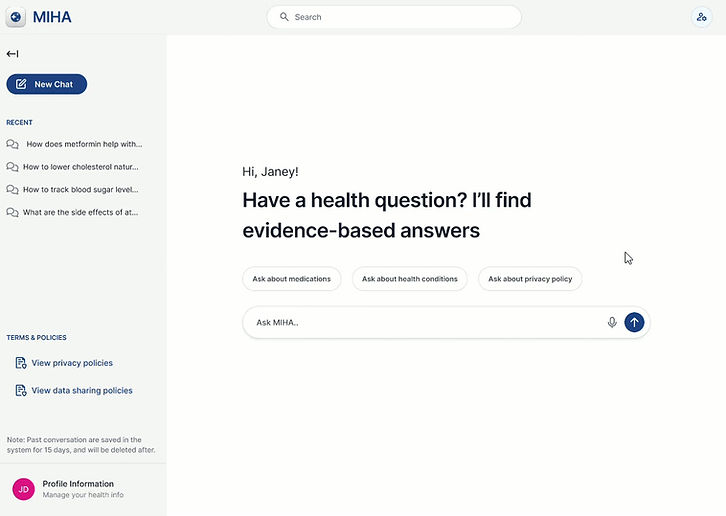
1. I want to know about MIHAs privacy policies
In existing products, users struggled to locate and understand privacy policies and found it frustrating to leave the tab to access this information. Our design consolidates all privacy details into a single, clear, and easy-to-understand experience.
Preferences set as NO

For users who doesn't want/care much about the privacy policy, we decided to next the Privacy Policy option in the Profile Management.
Preferences set as YES
To support users who want clarity around privacy, we placed the Privacy Policy in a highly accessible location. For deeper understanding, users can also discuss the policy directly with MIHA through a conversational interface.
2. I want to know who MIHA shares my data with
In many existing AI products, users lack visibility into how their data is used and who it is shared with, which undermines trust. Our design makes data sharing transparent by clearly showing who data is shared with, for what purpose, and by giving users control to grant or withdraw consent.
Data Sharing Consent Features (Screen below shows Preferences set as YES)

To give users greater control over their data, we designed the Update Data Sharing Consent feature. It helps users understand what data is shared, with whom, and for what purpose—making data use more transparent and clarifying inner workings of MIHA.
3. I want MIHA to remember my searches
Because users have different comfort levels with data (searches) retention, we gave them the option to choose whether their searches are saved or not.
Preferences set as NO

When the preference is set to NO, searches are not immediately visible on the screen and can only be accessed by expanding the sidebar. In this mode, searches are retained for 15 days, after which they are automatically removed.
Preferences set as YES

When the preference is set to YES, searches are always visible on the screen, and chats remain saved until the user chooses to remove them.
4. I want to know how MIHA comes up with answers
User trust was divided: some were comfortable relying on AI answers without references, whereas others needed verifiable citations to trust the information.
Preferences set as NO

While some users may not actively seek references, we still wanted to communicate the credibility behind each response. To do this, we introduced a response Reliability Score, signaling that answers are generated using trusted and credible sources.
Preferences set as YES
When the preference is set to YES, users are shown citations alongside responses. To further build trust, MIHA also displays a message—“Comparing multiple trusted medical sources for accuracy…”—while generating the response.

5. I want to know what health data MIHA has stored about me
Users want clear visibility into what health data MIHA has stored about them, including how it’s used and why it’s needed. This preference helps users feel informed, in control, and confident about what the system knows about them.
Preferences set as NO

With preference set at NO user, the Profile Information is available under profile management and readily not available on the screen.
Preferences set as YES
When the preference is set to YES, Profile Information is available on the sidebar for easy access.

PROJECT CONTRAINTS
As we wanted to complete the design, development, and testing of MIHA within a strict timeline, we had to make certain decision to cut down on the development timeline.
With MIHA, we were testing a new concept—whether a customizable UI could boost trust. To focus on validating this idea, we simplified certain aspects of development and testing.
1. Restricted to only YES & NO options
The design team initially explored YES, NO, and MAYBE responses for UI adaptation. However, after discussions with the PM and engineering team, we narrowed this to binary options to reduce technical complexity, streamline development, and simplify testing.
2. All YES or All NO preferences only
To validate the concept of UI adaptation and simplify testing, we kept preferences binary—all YES or all NO—rather than allowing a mix of both.
3. Balancing Design and Feasibility
Many features were designed to meet user needs, but implementing them at this stage would have been challenging. As a result, we had to prioritize and limit the scope.
WHAT DO USERS THINK?
Overall, the UI adaptation in the YES preference enhanced information access and gave users a better understanding of how MIHA works and generates responses compared to the NO preference.
I conducted usability testing sessions with 20 older adults over the age of 60. 60% of participants preferred being able to choose the information most important to them, which increased trust in MIHA and, in turn, supported adoption of AI for health. Adaptability mattered most when users could see and understand its impact.
UI changes (sources, layout, policy access) improved perception of control and trust, but did not consistently improve understanding of how the system works.
🔒 More in control: Clearer access to privacy policies, data controls, and chat management
🤝 More trust: Visible sources and well-structured responses were the strongest trust drivers
🧠 Better understanding of answers: Citations and status notes made response & its generation feel more transparent
😊 More comfortable sharing: With more system clarity users felts comfortable sharing personal info.
🔍 Access vs. Understanding: While the UI adaptation improved access to information, it had little impact on users’ understanding of how the system works.
RESEARCH IMPACT
This work suggests that giving users control over their interface, not just their data, can build trust and in turn increase AI adoption for sensitive areas like health.
MIHA demonstrates that UI adaptation—letting users choose what information matters most to them—can meaningfully increase trust in AI health tools.
This research opens the door for future health AI products to think beyond fixed interfaces and toward personalized transparency.
TAKEAWAYS
What I learned?
Designing for AI Skepticism
When designing AI for hesitant users, prioritize empowering investigation over streamlining experience. These users don't want simplified experiences—they want access to what's happening behind the scenes.
From Abstract Concerns to Concrete Features
User needs often present as feelings, not features. The designer's job is to trace those feelings back to specific information gaps or control deficits, then design interfaces that close those gaps.