


SCRIBE APP DESIGN
Building user trust and autonomy with a generative AI-powered application for managing health information for senior citizens, and achieving 100% user adoption.
TEAM
UX Researcher
UX Designer
DURATION
4 Months
PROJECT TYPE
Healthcare, Older Adults, Gen AI, CUI
NSF funded project
MY ROLE
UX & Interaction Designer Accessibility Designer
Conversational UX Designer
UX Researcher
BACKGROUND
Starting August 2023, I joined Prof. Aqueasha Martin-Hammond’s Research team to work on their NSF-funded project “Intelligent Systems for Health Information Management.”
This design project is part of our broader research project, which entails conducting testing sessions with older adults to validate the overall functionality of the Scribe AI application, including the trust and autonomy this app provides our end users.
PROBLEM
Older adults manage multiple chronic illnesses with various doctors
Older adults with many health problems often find it difficult to keep a comprehensive record of all their doctor visits and treatments. They also struggle to share their health details with those who take care of them, leading to possible missed information and problems in getting the right care. This highlights the need for easier ways to manage and share health information for older adults and their caregivers.

Patient

Meets with orthopedists every three months

Meets with primary care doctor once every month for diabetes checkup
Managing multiple doctor visits can be a difficult task for older adults. Hence, it is critical for them to have an effective method to manage their doctor visits.
SOLUTION
Generative AI-powered health app that records, transcribes, and generates summaries of doctor visits with an emphasis on fostering user trust and autonomy
By harnessing the power of generative AI, this tablet application will intelligently organize and consolidate users' doctor's visit history and medical records, providing a seamless solution to the challenge of maintaining comprehensive health information. With its user-friendly interface and AI-driven features, it will enable users to effortlessly track their healthcare journey, enhancing communication with caregivers and promoting better-informed decisions about their well-being, all within a single, accessible platform.

Find specific details from your doctor's visit instantly
Scribe AI transcribes all your doctor visits and categorizes them, simplifying access to medical documentation.
Inquire about your past doctor's visits or ask general medical questions
Scribe AI retrieves specific information from your previous doctor's visit or trusted medical sources on the internet.
UPDATING THE CONCEPT
The previous concept of Summarizing the Doctor's Visit Session lacked user autonomy and trust

Trust: Relying on untuned Large Language Models for generating summaries in health apps poses significant risks due to potential inaccuracies, lack of sensitivity to medical contexts, and regulatory non-compliance.
Autonomy: Giving the users autonomy to control the summary length can lead to decision fatigue. This can lead to miscommunication due to the controlled length of the summary.
Concept designed by our UX Researcher
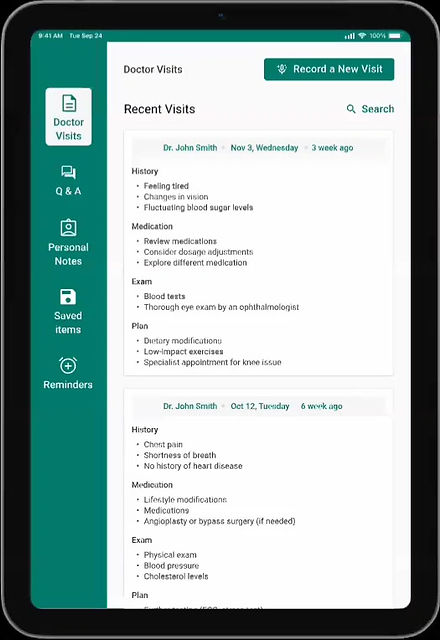
The new concept of Categorizing the Transcripts from Doctor's Visit into Four Major Groups: History, Medication, Exam, and Plan

Fosters Autonomy and Trust
Trust: Retaining and displaying actual conversation instills confidence in users.
Control: Grants users freedom and control over the content they wish to view.
Transparency: Makes it easy for the user to understand how the system made this content.
Errors Control: Less errors compared to summary and omission of details.
This design solution increases the trust and autonomy among the users, and drives adoption.
DESIGNING THE SOLUTION
Following the fundamentals of designing good AI products
As the Scribe application is designed for senior citizens to manage their health information using AI, it was important to establish AI design principles for an efficient and trustworthy product.
Trust & Transparency
Giving the users a clear understanding of how the AI works
Source of information that comes from the AI chatbot
User Control
Easy navigation between different sections of the generated summary.
Error Handling
Allow users to make edits to the summary and the transcripts.
Accessibility
Multiple modailty to view and add the data.
Freedom to change the source of the information.
Features of the Application
Our UX researcher had already conducted user research and defined the problem statement and the concept of the solution. I joined during the designing and prototyping phase of the project.
1
Recording the doctor’s visit session.
2
Text categorization to summarize the doctor’s visit session
3
Chatbot to ask questions about health-related issues.
4
Text simplification to simplify doctor’s notes.
5
Sharing feature to share information with caregivers.
6
Autonomy pieces in the app (modality, source, etc.)
Design Decisions
I first created an accessibility-focused design system, as the application's end users are older adults. This design system included style guides, a component library, and a pattern library. This step was crucial in the design process, as it will help the team maintain consistency and efficiency throughout the process.
After finalizing the design system, we jumped straight into designing the app. With multiple iterations, back and forth with the researcher and my fellow designer, we finished designing the app. See how we did it all :)
1. Navigation Bar


Removed share and text summary options from the navbar because:
1
Having seven options was cluttering the navbar alot and could lead to confusion for users.
2
Incorporating "share" and "text summary" as part of the menu items instead of having it on the navbar, as those feature are only used in "doctor visits" and "q&a" pages, so having share and text summary in those sections was a better design decision.
2. Doctor's Visit Page or Homepage?
Homepage with all details

Doctor Visit page as the homepage

The next question was: how do we want our homepage to look?
Should we have a regular Homepage with details about everything, or do we want to just have our Doctor Visits page as the homepage of our application?
Decided to go with the Doctor Visit Page as the homepage because
1)
We wanted the application to be very simple and informative. Hence, we decided to keep the doctor visits page with only the summaries of the previous three visits
2)
We also considered the purpose of designing this app: concept validation with senior citizens. Hence, we wanted to only focus on the study protocol tasks, and recording the doctor visits and viewing generated summaries were the big tasks to focus on.
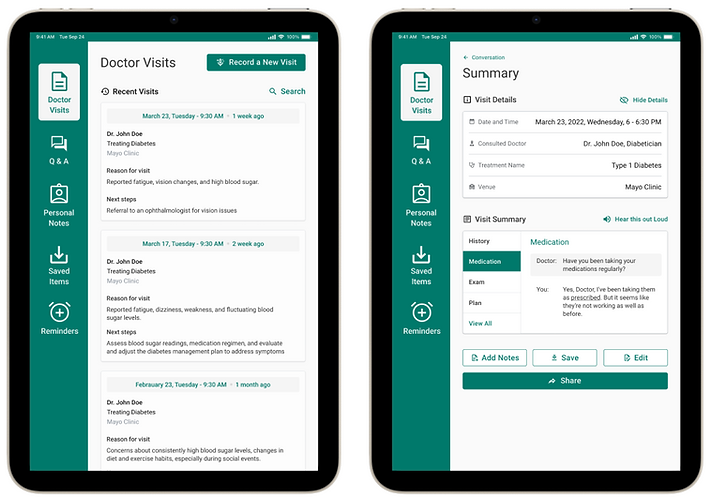
After multiple iterations of the Doctor Visits page, this flow was finalized based on its informativeness of the visit summaries.
.png)
Doctor Visit with quick informative summary of the visit
.png)
Visit details and transcript

Visit summary
.png)
Add Notes
OR
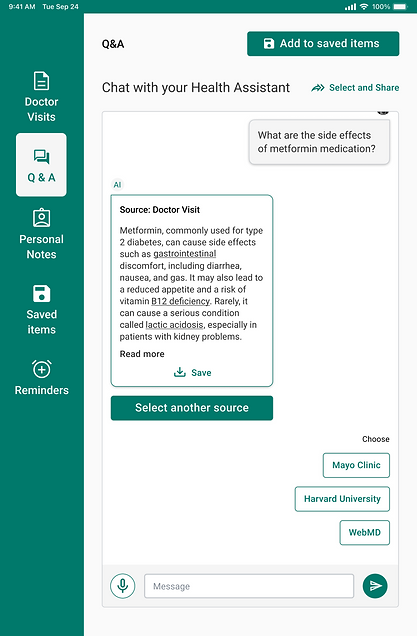
3. Chatbot/Q&A

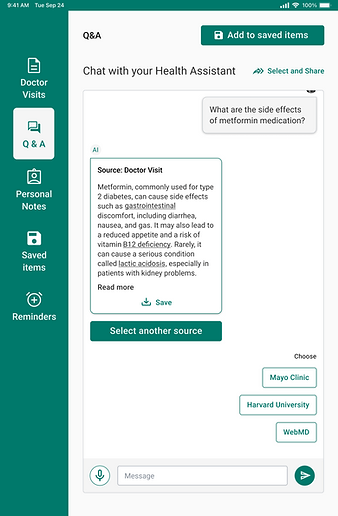
Freedom to choose sources
.png)
Chatbot with freedom to choose sources
4. Sharing with caregivers

Share with caregiver

Share overlay
5. Text simplification

Definitions available for complicated terms in visit summaries and Q&As with the source of the information.
6. Personal Notes
.png)
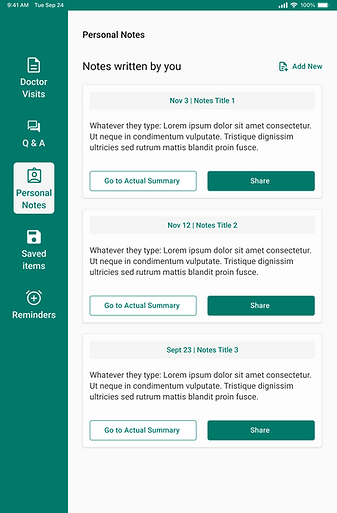
All the summary notes made by the user will be stored on this page. The user has the option to view the original summary or to share these notes with caregiver.
PRIORITIZING ACCESSIBILITY
Since most of our user base is older adults, it is critical for us to design an accessible product for them.
47%
People from 61-80 years of age experience some hearing loss
50%
People over 65 are affected by arthritis or other conditions affecting motor skills
16%
People aged 65-74 experienced significant vision loss that can't be corrected
20%
People aged 70 or older experience mild cognitive impairment, which may include short-term memory limitations, difficulty with concentration, or other symptoms
Utilized WCAG's 4 Guiding Principles: POUR (perceivable, operable, understandable and robust)
.png)
Operable
Established clear hierachy and navigation, with clear CTAs.
Robust
Content can be accessed in different views.
Perceivable
Offered audio and text content that caters to broad user groups
Perceivable
Ensured a high contrast between the foreground and background by adhering to AAA contrast ratio standards
Understandable
Presented quick overviews, and considered good spacing between elements.
.png)
Understandable
Ensured all the CTAs appear and operate predictably
Operable
Multiple input modalities like text and voice.
Clear transcription of voice to text, giving freedom to user to edit the input
PROTOTYPE
Viewing visit summaries and making notes
-
In the Doctor Visit session of the application, the user can view all the overviews of past visits.
-
After clicking on a particular summary, the user can see the visit details and the transcripts.
-
The user can see the detailed summary of their visit, which is divided into four sections: history, medication, plan, and exam.
-
The user can then add notes referring to the original summary.
Chatbot and sharing with caregivers
-
On clicking the Q&A, the user would be taken to a chatbot to ask questions related to the visit or any medical questions.
-
The user can either type their question in the chatbot or use the mic to ask questions.
-
The user also has the option to share parts of the chat with their caregivers.
Try out the prototype here: Scribe prototype
USER TESTING
Testing the prototype to evaluate trust and autonomy
The goal of this research project was to validate the trust and user autonomy of the Scribe app for health information management.
1
Lo-fi prototype concept testing
6/8
users did not trust the responses from the chatbot as they did not know the source of the answer.
5/8
users felt that the application was not enough to manage their health. They need more resources.
6/8
users said there were a lot of unnecessary autonomy features creating confusion.
7/8
users said they are not willing to use this application to manage their health.
2
Hi-fi prototype concept testing
5/5
users trusted the application's chatbot and summarization features
5/5
users felt they had complete control while using the application, indicating autonomy.
4/5
users felt that the application provided necessary features to manage their health.
5/5
users were confident and willing to use the application.
FINAL THOUGHTS
Next Steps
1
Make design updates to follow the principles of great designing AI products, such as clear UX writing for transparency and trust.
2
Improving the usability of the application, as we were successful in achieving 100% user acceptance.
3
Recruit more participants to test the autonomy and trust of the product.
Takeaways
This project was one of the most fun projects I have worked on for a few reasons:
-
This was my first time designing an application with accessibility as the core! I became proficient at incorporating WCAG guidelines into my design. I designed components for mental and cognitive disability.
-
I learned so much more about accessible design and micro-interactions during this project
-
Although I was not part of the research for this project, I did good with transforming research insights into an interactive and accessible prototype.
-
I finally had an opportunity to design an AI-powered product, and I practiced ethical AI Design.
Read MIHA Case Study