


ExacqVision VMS
B2B Enterprise Product
Untangling Complexity: How Strategic VMS Redesign Improved Usability by 54%

ROLE
UX Designer
UX Researcher
TIMELINE
8 Months
TEAM
1 PM
2 Engineers
PROJECT TYPE
Security Industry, Redesign Project, Enterprise
PRODUCT OVERVIEW
Johnson Controls' ExacqVision is video management system (VMS) software used by ~400k organizations with about 1M+ users globally.
ExacqVision stands out for its flexibility—supporting 5,000+ camera brands and offering hybrid deployment options—making enterprise-grade surveillance accessible and cost-effective without vendor lock-in.
It helps organizations monitor and manage their security camera systems. It acts as a central platform where users can view live camera feeds, record and search footage, and configure camera settings across multiple locations.
MY WORK
I led the redesign of the configuration experience of ExacqVision Desktop Client
I redesigned ExacqVision's configuration experience—essentially the "Settings" of a surveillance system. I owned the project end-to-end, from user research to design handoff.
IMPACT
54% increase in system usability
Both expert and novice users found the redesigned flows easy to follow.
2.7X faster task completion time
While the system was designed to be more intuitive, efficiency was not lost.
BUSINESS PROBLEM
With net favorability plummeting from 42% to 4% in just 6 years, ExacqVision faced a crisis that threatened its market position, making our customer base stagnant.
Despite being compatible with nearly every camera brand on the market—our biggest competitive advantage—ExacqVision wasn't even ranking in the top 10 VMS systems. The interface looked frozen in the early 2000s while competitors shipped modern, intuitive experiences.
Configuration Page
.png)
...but redesigning for loyal users meant we couldn't just make it pretty.
Our users had developed strong mental model over the years, so a complete redesign risked alienating our most loyal customers. We needed to modernize the experience while respecting existing workflows—which meant understanding what was actually broken versus what simply looked outdated.
UNCOVERING THE REAL PROBLEM
The final designs were clean, but getting there required digging through years of complexity.
A sneak peak of the redesign
Server Dashboard

But I needed to first understand why the current system was failing before I could fix it...
I spent weeks understanding how the system actually gets used.
I visited installation sites and observed integrators wrestle with the interface while setting up multi-camera systems. I interviewed them as they added devices, documenting every moment of confusion. I sat with support teams to understand which problems users called about most. I analyzed how competitors like Milestone, Genetec, etc. approached configuration. And I conducted a comprehensive UX audit of every workflow.


...and discovered users had no map to navigate the system.
PAIN POINTS
The Navigation Problem
Everything—client features, servers, and hundreds of cameras—lived in one sidebar. Scrolling to find Camera 47 took forever.
The Context Problem
No dashboard meant users landed in the system blind. Finding this data required navigating through multiple disconnected menus.
The Discoverability Problem
Advanced features like camera configuration existed but were buried. Even when users found them, brand-specific settings were incomprehensible.
How might we redesign the configuration flows to accommodate users of all experience levels ensuring that tasks are completed efficiently and effectively?
DESIGN DECISIONS
Optimizing the user flow
Every problem traced back to one issue: users had no framework to understand the system. They needed clear starting points, logical groupings, and visible system status. I introduced two dashboards that became the backbone of the redesign: the Configuration Dashboard for managing the entire VMS, and the Server Dashboard for device and server management.

Configuration Dashboard
The current version of Exacq lacked a starting point in the configurations workflows, leading to frustratingly long workflows and confusion. I designed an improved user flow with the client dashboards acting as the starting point to access all the client features
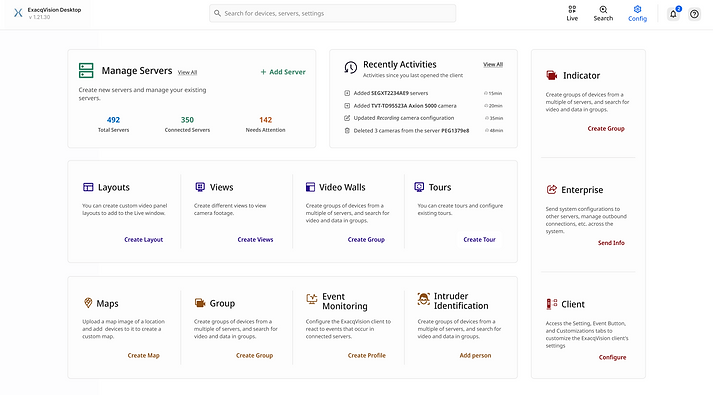
Global search bar for easy navigation
Configuration Dashboard
Feature descriptors for more context
Prioritizing features with more screen space
Server Dashboard
The current version of Exacq lacked a centralized space for managing individual servers and their associated devices. I designed a server dashboard to manage each server in one place and proposed two new features—Server Storage Details and Device Monitor—based on user research highlighting frustrations with monitoring server storage and devices.
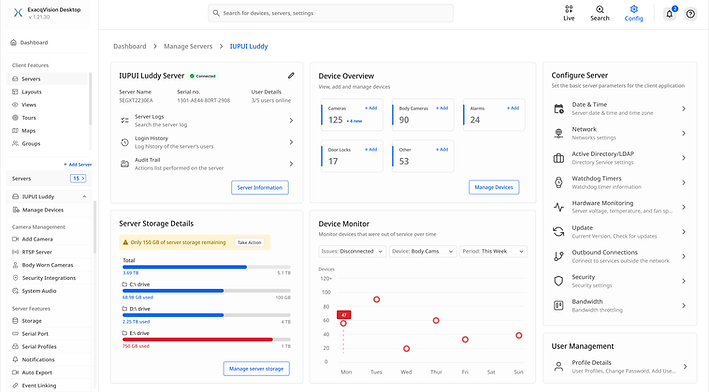
Easy navigation using breadcrumbs
Server Dashboard
Data storage and Device Monitoing features were added as it was a user need.
Fixing the sidebar crisis
A considerable amount of effort was dedicated to refining the sidebar, a crucial element of the Exacq configuration workflow and core navigation feature. Through numerous iterations, the sidebar was meticulously redesigned to enhance user experience and ensure scalability.
Unrelated features
Confusing tree
Endless scroll
.png)

Categorized
Scalable
Clean
Separation of Functionality
Currently, the “Add IP Camera” / “Add Server” screens combine device / server lists on the same page, making the interface cluttered and confusing. I improved clarity by separating the camera/server lists from the add flows into dedicated screens, allowing users to manage and add devices through more focused, task-specific interfaces.
Manage Devices
"Add Camera" CTA will take the users to Add Camera page that has two modes to add cameras

List of devices in the server can be viewed here
Clear "Configuration" icon that will allow users to configure the camera, improving the discoverability of camera configuration features
Improving Feature Discoverability
Camera configuration features were underused due to poor discoverability, especially for non–VMS-savvy users. We improved discoverability with clearly labeled configuration tabs and introduced an interactive AI Help feature based on our exisiting compherensive user manual to make customization easier to understand.
Camera Configuration
Alerts to inform users about the system status
AI assistant built on manufacturer manuals, and our user manual

Clearly labelled tabs for easy navigations between feature
FINAL FLOWS
Optimized Dashboard for Streamlining System Configuration
Both technical integrators and non-technical end users can now navigate features confidently. The Client Dashboard shows what's available, explains what each feature does, and provides direct access to priority actions like server setup and system configuration.


Effortless Server Management
Integrators and non-technical end users now possess a comprehensive understanding of server features via the server dashboard, enabling them to efficiently execute critical tasks such as server setup, managing devices, etc. This streamlined approach facilitates smoother operations and enhances the overall user experience.

Enhanced Understanding of Camera Configuration
The camera configuration process is streamlined with clearly organized configuration features, informative tooltips, and AI-assisted configuration help.

USER THOUGHTS
Did this redesign actually work for users of all experience levels?
The biggest risk was alienating one group while helping the other. I needed to validate that expert integrators could still work efficiently while novice users felt empowered.
I ran 7 usability sessions: 4 with technical integrators who'd used ExacqVision for years, and 3 with non-technical users (security staff) who struggled with the current system.
Key insight: The dashboards worked as the universal starting point for both groups. Experts could quickly navigate to advanced features. Novices could explore with descriptions and AI guidance. The system didn't dumb down for one or overcomplicate for the other.
Integrators: Faster without losing control
"I was skeptical at first, but the workflow is familiar and just as efficient. And I absolutely love the status indicators."
- Integrator
Non-technical users: Confident and independent
"Before I'd have to call someone to help me. The descriptions on the dashboard tell me what everything does."
- Security Staff
TAKEAWAYS
What I learned?
Prioritizing Features
Working on a feature-rich enterprise product taught me to prioritize ruthlessly—focusing on high-impact features that solved real user problems, even when stakeholders wanted everything.
Design for Flexibility & Scalability
Designing for scalability from day one meant the system could handle both small businesses and enterprise deployments without being unusable. This flexibility reduced future redesign costs and allowed the product to evolve with user needs.